GPS Tracker for Dog No Subscription: Trade-offs and How to Choose
A GPS tracker for dog no subscription works when location reaches you by radio or Bluetooth instead of a paid cellular plan. Compare range, update speed and battery, then choose.
The Millbrook Team
November 9, 2026 · 9 min read
A GPS tracker for dog no subscription is possible, but only when the device does not need a cellular plan to send its location to you. The satellite part of GPS is free to receive; the monthly fee usually pays for the cellular link that carries the position to your phone. So the real question is how the tracker gets the location from the collar to you: radio, Bluetooth, or cellular.
This guide explains each method, compares range, update speed and battery trade-offs in one table, and gives you steps to match a tracker to the way you walk your dog.
Why a GPS tracker for dog no subscription comes down to the link
A tracker does two jobs. First it works out where it is, using satellite signals. Then it reports that position to a screen you can read. The first job costs nothing. The second is where fees, range limits and battery drain come from.
When a listing says "no monthly fees," check which link it uses. A device that reports over a mobile network normally needs a data plan somewhere, whether billed monthly, yearly or prepaid. A device that reports over radio or Bluetooth does not use a network, but it works only within the reach of that signal.
That is why a no-fee tracker is not a subscription model with the bill removed. It is a different tool with a different set of limits, and the right pick depends on where your dog roams and whether you want live tracking or a record of the walk.
The three ways a no-fee dog tracker finds your dog
Radio: a collar unit and a handheld receiver
Some trackers pair a collar unit with a separate handheld screen. The collar works out its position and sends it to the handheld over radio, so no phone signal or cell service is involved. This suits open country, hunting trails and farmland where coverage drops out.
The trade-offs: you carry a second device, radio reach depends on terrain, and trees, hills and buildings can block the signal. Check the manual for how the handheld and collar unit are paired, and pair them at home before you head out.
Plan a charging routine for two devices, not one. Put the collar unit and the handheld on the charger the night before a long outing, and carry the cable if you will be away overnight. Keep the handheld where you can reach it, since a unit buried in a pack is easy to miss when your dog bolts.
Bluetooth: your phone as the receiver
Bluetooth trackers talk directly to your smartphone. The range is short, so they work for a yard, a campsite or a trailhead, and they tell you whether your dog is near rather than drawing a long track across a map. Some Bluetooth tags rely on other people's phones passing by to report a position, which only helps where such phones are around.
These are light and small, which suits a small dog, but they are a proximity tool more than a full GPS tracker.
Your phone settings matter here. Keep Bluetooth switched on, allow the app to run in the background, and turn on location permission and notifications for it. If the phone is in a bag or a coat pocket, a body or a wall between it and the tag can shorten the reach, so keep the phone with you and in the open when you are searching.
Cellular: wide coverage, usually a plan
Cellular trackers send the position over a mobile network, so you can see your dog from anywhere with coverage. This is the model that normally carries a monthly or yearly plan. Some devices use a prepaid or one-time arrangement instead, so read the plan terms on the product page before you buy, and confirm what happens when the plan period ends.
Logger mode: record now, look back later
A fourth option records a track and lets you look back at it afterward. You do not see the dog live, but you can see where a walk went. A tracker with built-in storage keeps a history for that purpose.
Range, update speed and battery: the trade-off table
Use this table to compare the three links and the logger option. The entries describe how each method generally behaves; exact figures vary by model, so read the specification on each product page.
| Link | Range | Update interval | Battery | Ongoing fee | Suits |
|---|---|---|---|---|---|
| Radio with handheld | Line of sight; terrain and trees reduce it | Set by the handheld | Collar unit and handheld both need charging | Check the product page | Rural land, off-grid trails |
| Bluetooth to phone | Short, about a yard or campsite | Continuous while connected | Small cell, light device | Check the product page | Yards, small dogs, nearby checks |
| Cellular | Wherever the network reaches | Frequent updates draw on the battery more often | Varies with update interval; check the product page | Often a plan applies | Neighborhoods, travel, wide roaming |
| Logger with storage | Not live | Recorded as you walk | Depends on how often it records | Check the product page | Looking back at routes afterward |
Two rules hold across the table. A short update interval keeps the dot on the map close to your dog's current position and draws on the battery more often. Reach through a network usually brings a plan with it.
Which GPS dog tracker is the most accurate?
No single model is the most accurate everywhere, because accuracy depends on conditions as much as on the device. A clear sky helps a position fix; dense tree cover, deep valleys and the space between tall buildings weaken it. A dog standing still in an open field is easier to locate than one moving through woods.
When comparing, look at the update interval, the age of the last position shown, and whether the app marks the "last known" location when the signal is lost. A map that lags by one update can place your dog behind where it really is. A history log helps too: looking back at a recorded walk shows how closely the track follows paths you know.
How to read plan terms before you buy
"No subscription" can mean several things, so read the product page for the details below. Do not assume a free feature stays free.
- Billing period: monthly, yearly, prepaid or a one-time payment.
- What the plan covers: the map, the alerts, the history, or only the cellular link.
- What stops working when a plan lapses: some devices keep a basic function, others lose live location.
- Whether a feature such as a safe zone alert or location history needs the plan.
- Where coverage applies, and whether it differs when you travel.
- The cancel and renewal terms, if any.
If the page does not answer one of these points, ask the seller before you order. A clear answer now is better than finding a gap on the day your dog gets loose.
Choose in five steps
- Write down where your dog actually goes: fenced yard, neighborhood, parks, woods, or farmland.
- Check cell service at those spots on your own phone. If it drops at your usual trail, a cellular-only tracker has a gap there.
- Decide whether you need a live view or a record. A live view calls for a frequent update interval; a record only needs storage.
- Match the weight and size of the unit to your dog. Compare the tracker weight on the product page with your dog's weight and collar width.
- Confirm the app works with your phone's operating system and read the plan terms for any feature that sounds free.
If your dog is a runner or a scent hound, put range and battery first. If your dog is a house escape artist, a safe zone alert and a look at the map matter more than long-distance reach.
Small dogs: weight, strap and attachment
For a small dog, the unit itself is the first constraint. A heavy tracker hanging off a thin collar can twist and sit awkwardly. Look for a lightweight tracker and attach it where the collar sits flat, not dangling from the front.
Check that the collar or strap is wide enough to hold the clip without bending. If you use a harness instead, our guide on measuring a dog's chest for a harness shows how to size one so the tracker position stays steady.
A collar-clip tracker with a safe zone and stored history
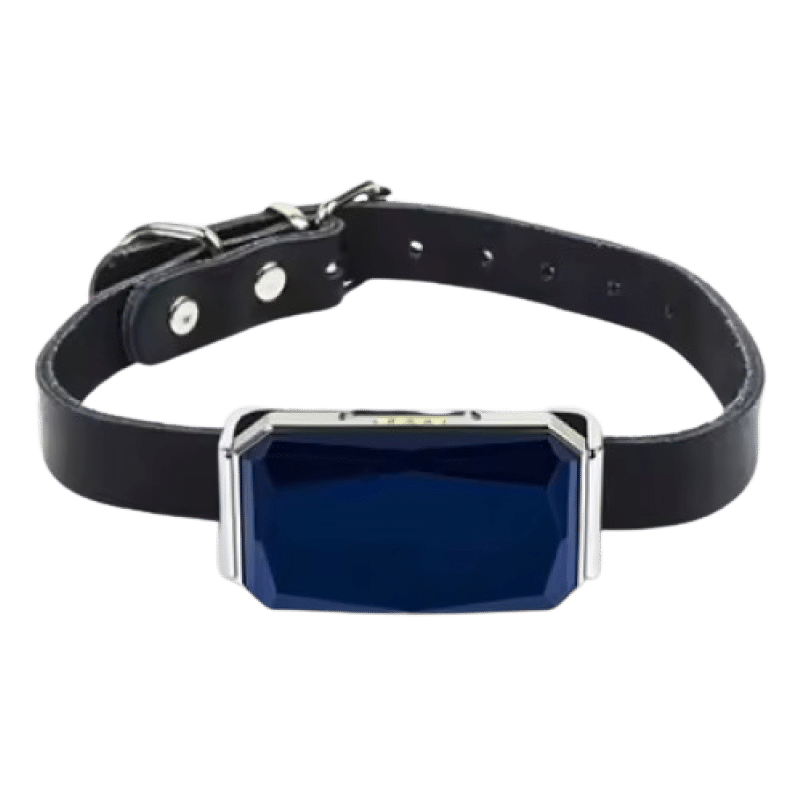
TrailTrace is a GPS tracker that clips onto a collar and pairs with a phone app, where you watch your dog's location live and set safe zones. When your dog steps outside a safe zone, the app sends an alert based on the tracker's GPS location. It has 8GB of storage that keeps a tracking history, so you can look back at past walks.
The same device can be used on a car or a bike rack, which helps if you want to follow more than your dog. The shell is water-resistant, made for muddy trails and wet grass. The box includes a leather strap. This guide does not say whether a plan applies to TrailTrace or how location is delivered to the app, so check the product page for whether any plan applies before you decide.
 In this guideTrailTrace$119.99View
Field note
Before relying on any tracker, walk a short loop with your dog on a leash and watch the app. If the dot lags or jumps in your usual spots, you know its limits before a real escape.
Setup checklist, common mistakes and care schedule
Before the first walk
- Charge the tracker with the supplied USB cable before first use; the box with TrailTrace includes one.
- Download the app and sync the tracker with your phone. The app guides you through setup.
- Set a safe zone around your yard and check that the alert reaches your phone.
- Clip the tracker onto the collar and confirm the collar still fits with room for two fingers.
- Walk a short test loop and compare the map with your real route.
Mistakes to avoid
- Buying on the phrase "no subscription" without checking how the position reaches you.
- Letting the battery run low before a trip. Charge on a routine, such as before weekend hikes.
- Placing the safe zone too tight, so ordinary garden play triggers alerts.
- Leaving notifications off in the phone settings.
- Using a tracker in place of a secure fence, a leash and a solid recall.
If a dog pulls hard, work on the walking first; our guide on how to stop leash pulling covers it. To pair a tracker with a leash or harness, browse leashes, harnesses and car travel.
Care schedule
| When | What to check |
|---|---|
| Before each walk | Battery level in the app, clip secure on the collar |
| After muddy walks | Wipe the shell with a damp cloth and dry it; follow the manual |
| Weekly | Collar strap condition, charging port clear of debris |
| Monthly | App update, safe zone settings, test alert |
| When storage is full | Look through and clear old tracking history if the app allows |
Water-resistant does not mean the device should be submerged, so keep to what the manual lists. Unplug the charging cable once the tracker is charged.
Is there a fee-free option that fits your dog?
Yes, if you accept the limits. Radio trackers suit open land with no network. Bluetooth tags suit a yard and a nearby check. Cellular trackers cover the widest area but normally come with a plan. Match the link to your terrain first, then compare battery and weight, and read the plan terms on any product page so you know what you pay, if anything, after the first purchase.